

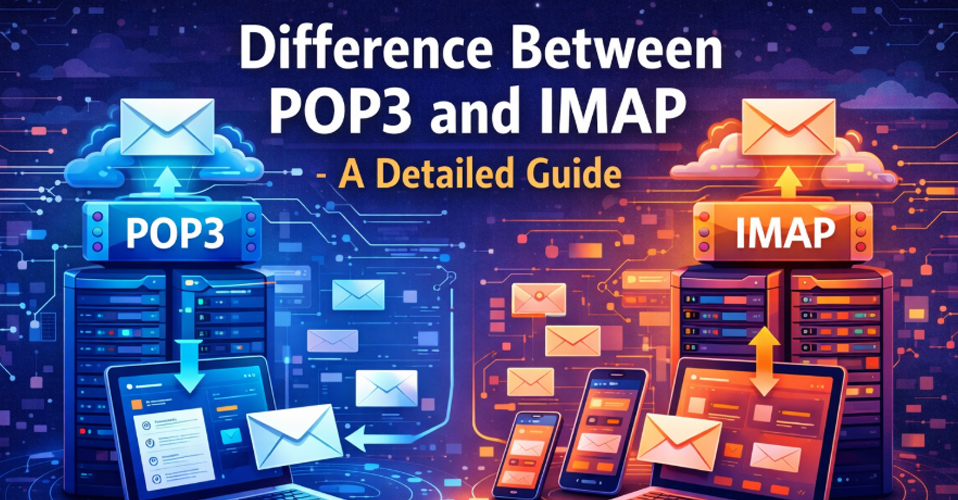








Before understanding the difference between POP3 and IMAP, first lets see what they actually are. POP3 and IMAP are delivery systems used by almost every email client in the world. Delivery systems are the languages that help in receiving emails from the mail server to the receiver’s device.
POP3 (Post Office Protocol)
POP3 is a protocol language that helps your email app receive mail from the email server. Think of it as a post office, you go there, pick up your letters, and take them home. Once you leave, the post office no longer has your letters; they are only at your house.
Similarly the POP3 downloads the mail on your computer’s hard drive upon receiving it and instantly deletes it from the mail server.
There is no syncing in POP3. If you download the mail on your computer, you won't be able to see it on the email app on your mobile.
It is best for people who use only one device, have a limited mail server storage space and have a bad internet connection or for the ones who want to read their mail offline.
When you receive an email from someone it would come in the form of username@outlook.com.pst. Although Microsoft Outlook has an option to use POP3 for receiving mails, it is rarely used nowadays as it cannot be used on multiple devices and people nowadays want to access their data on various devices.
There are a lot of softwares out there that provide this service, but for me personally I would recommend the SysTools PST converter. It is quite reliable and the best in this sector.
IMAP (Internet Message Access Protocol)
IMAP is one of the primary languages that helps your email app in receiving mail from the mail server. Imagine it as a giant glass wall at the post office. You can see your letters through the glass and even interact with them, but the letters stay inside the post office.
Similarly the IMAP keeps all the emails in the receivers server and provides you with only the copy. When you click on one of your emails the IMAP shows you the copy of that mail while it keeps the original copy safe in the mail server.
There is full synchronization in this language, all the devices are connected and if you delete something from your computer it will show on the email app on your mobile. Even the read status and sent items are all the same and this is one of the major difference between POP3 and IMAP.
It is best for the users who use multiple devices like desktop, mobile and laptops all the devices are synced and emails are the same. It is the most widely used language nowadays as it supports multiple systems at the same time and the users want to access their data on multiple devices.
When you receive an email from someone it would come in the form of username@outlook.com.ost. There is a lot of software out there that provides this service, but for me personally I would recommend the SysTools OST converter. It is quite reliable and the best in this sector.
Difference Between POP3 and IMAP
Difference between POP3 and IMAP account
The difference between POP3 and IMAP account is that while POP3 downloads the mail to your device and then deletes it from the mail server, IMAP does not delete anything. It saves the original copy on the email server and shows you only the copy of the email.
One of the major difference between POP3 and IMAP is that in POP3 there is no syncing as such, whereas in IMAP there is syncing.
In IMAP all the devices are connected. If you delete something from your computer it gets deleted from everywhere, even the mail server as well. In POP3 you cannot do this, you can only view the mail from one device only as the mail in the server gets deleted as soon as it is downloaded on your device.
In POP3 the folder that is created on your computer stays there itself, it cannot be viewed on your laptop or mobile. Whereas in IMAP you can view a folder on any device be it laptop, computer or even a mobile.
Another difference between POP3 and IMAP is that POP3 uses very little server storage, whereas IMAP uses far larger space of the server storage.
The loading speed is faster in POP3 as it is already downloaded, as in IMAP the speed can be a little slow as it speaks to the server.
Difference between POP3 and IMAP email
Another difference between POP3 and IMAP email is that when you receive an email from someone it would come in the form of username@outlook.com.pst when using POP3 and in the form of userame@outlook.com.ost when using IMAP.
Difference between POP3 and IMAP and SMTP
The difference between POP3 and IMAP and SMTP is that while POP3 and IMAP are used for receiving emails from the mail server, SMTP is used to send the emails from the sender to the receiver’s mail server.
Which Delivery System To Choose?
Since there is a major difference between POP3 and IMAP, you should have a serious thought before you choose any one of them..
Choose IMAP if
You work on more than one device like a computer, laptop and mobile. In this sense IMAP is better than POP3 as this is the major difference between POP3 and IMAP.
You have a stable and an always-on internet connection.
You want a backup for all your mails.
Choose POP3 if
You check your email on only one specific computer.
You have a very slow or limited internet.
You have a very small mailbox limit and need to clear it out constantly.
After looking at the major difference between POP3 and IMAP lets see what exactly is MAPP/HTTP.
What is MAPI/HTTP?
While POP3 and IMAP are universal standards used by everyone, MAPI/HTTP is a specialised high-performance technology designed specifically for the deep connection between Microsoft Outlook and its server- Microsoft Exchange. Let's take a look as to why this proprietary language makes the corporate experience so much better:
Unique Features of MAPI/HTTP
Unified Synchronization
IMAP only knows how to move your mail. If you want to sync your calendar you'll need a separate software and if you want to sync contacts then another one.
Here is when MAPI/HTTP comes into the picture. It doesn’t see your account as just an inbox, rather it sees it as a single database containing mail, calendars, contacts, tasks, and notes. As it uses one single language for everything, all these items sync simultaneously and perfectly.
Connection Resiliency
The old protocols break if your internet breaks, forcing you to re-authenticate but MAPI/HTTP has a built-in pause and resume capability. If you close your laptop and open it an hour later at a coffee shop, Outlook picks up the connection exactly where it left off, without a disconnection warning.
Faster Performance
Unlike the old protocols MAPI/HTTP is more efficient and fast. It removes a layer of packing around your data. Your emails show up faster and your calendar updates as soon as someone sends you an invite to a meeting.
Advanced Features of MAPI/HTTP
Since MAPI/HTTP is the company's own server it unlocks features that are impossible with IMAP.
Out-of-Office Rules: You can set complex Vacation Replies that run on the server even if your computer is turned off.
Shared Mailboxes: You can open a second inbox right under your name and manage it seamlessly.
Modern Security: It supports Multi-Factor Authentication (MFA) and biometric logins which are often much harder to set up with basic IMAP or POP3.
Public Folders: Companies can host shared file or message repositories that everyone can see.








Add Comment